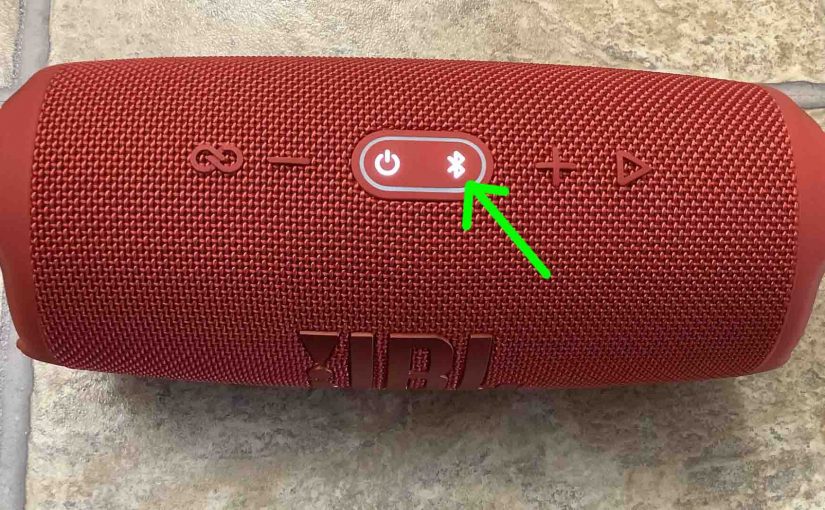
To pair the Charge 5 JBL BT speaker with a Bluetooth source device for the first time, or to download the connection information for the speaker onto that device, you must know how to make the JBL Charge 5 discoverable. In this mode, this speaker broadcasts its Bluetooth name and current linkage data over the Bluetooth medium. So in this piece, we show you how to get into discovery mode on the JBL Charge 5. Thus, you can join it to tablets, phones, other speakers, and computers and play music from them on it.
How to Make JBL Charge 5 Discoverable, Step by Step Directions
1. Turn On the Charge 5
Firstly, turn on the speaker by pressing its Power button once.
E.g. See this button, that we point out with the bright green arrow in the next picture.
The speaker then comes on, as pictured next.
2. Press the Discovery Mode Button and Release when the Lamp in that Button Starts Quickly Flashing
Secondly, to discover your speaker on your source Bluetooth device, you must put the speaker into discovery mode. For that, press and release the the Discovery Mode button, as we point out in the next picture.
Furthermore, when you press this button, the speaker makes a plucking guitar pairing sound. Plus, the lamp in that same button starts quickly blinking white, as shown in the last picture.
3. Done with How to Make JBL Charge 5 Discoverable
While the Discovery Mode button light flashes, you should see your Charge 5 JBL on any in-range phone, computer, tablet, or smart speaker, as shown next.
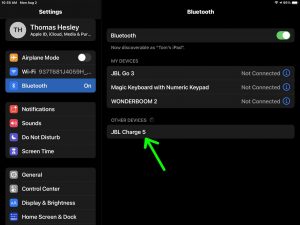
Your JBL Charge 5 is indeed now in discovery mode.
Other Posts About the JBL Charge 5 Bluetooth Speaker
- JBL Charge 5 Software Update Instructions
- How to Charge JBL Charge 5 Speaker
- JBL Charge 5 Charging Time
- JBL Charge 5 Reset Instructions
- How to Factory Reset JBL Charge 5 BT Speaker
Related Posts to How to Make JBL Charge 5 Discoverable
- Making the JBL Charge 4 Discoverable
- How to Make JBL Clip 3 Discoverable
- Making the JBL Charge 3 Discoverable
- How to Make JBL Xtreme 3 Discoverable
- Making the JBL Xtreme 2 Discoverable
References for How to Make JBL Charge 5 Discoverable
Revision History
- 2021-08-09: First published.