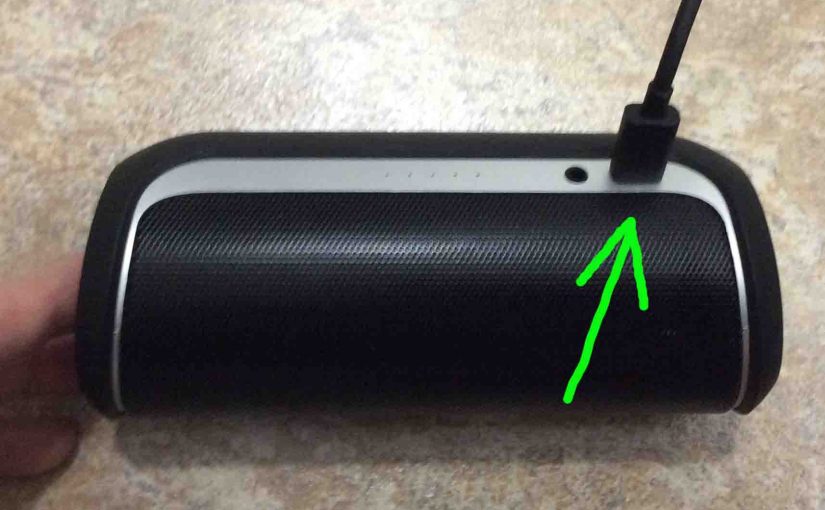
Most JBL Bluetooth speakers, including the Flip 2, offer truly portable operation via their lithium ion batteries inside. And when said battery runs low, you can recharge the speaker with an AC or car adapter. Sometimes however, you may notice that the JBL Flip 2 is not charging fully, or at all, even when you connect the adapter to power, and then to the speaker. To solve that, we have information here to help.
How to Tell that the JBL Flip 2 is Not Charging
Among the ways you can tell that the Flip 2 is not charging, is by reading the battery status gauge on the top of the speaker. Now the meter changes from white to pulsing red during play, to alert you that the battery is running low.
But there’s a problem if this flashing keeps going, even when you attach the charger. Why? Because the battery gauge should change at this point though, to blinking white, when you apply charger power. When the gauge stops flashing red, this means that the speaker is getting some power from the adapter. But if the red blinking continues, then correct recharging is likely not happening.
You can also feel the power supply’s case ten or fifteen minutes after connecting it to the speaker. Then, it should feel warm. The same with the speaker also. Note that the speaker itself heats up a little as well during correct recharging. But if you detect no warmth, then again, the JBL Flip 2 is likely not charging.
Moreover, the battery gauge normally shows battery recharging status. I.e. As long as charging continues, one of the progress lights in the meter flashes white. And, as mentioned, the gauge fully darkens when recharging is complete. But if the battery status meter is still blinking after several hours of recharging, then chances are, charging is not working correctly.
Thus when you notice that the speaker is not recharging, even though it should be, you’ll want to determine why, and how to resolve this problem. So in this piece, we offer reasons why the JBL Flip 2 may not charge when you connect it to power. Then we give possible fixes for this seen-often difficulty.
JBL Flip 2 Not Charging, Causes and Fixes
As we stated above, it’s normal that the battery status gauge pulses red when the battery inside is almost dead. But again, the light should switch to a blinking white when you connect the speaker to a working charger, and the charger to a power outlet, and battery recharging begins.
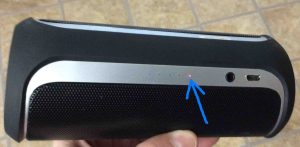
Normally though, this gauge only flashes white when the battery is not getting near dead. It can look as follows.

Or, if the speaker is OFF when charging starts, and you don’t turn it ON during charging, then once recharging finishes, the battery meter goes dark. See this in the next picture.
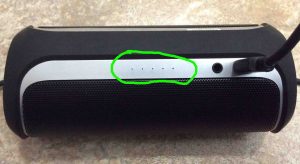
If the meter light does not change to flashing white when you plug the charger into the speaker, then several things might cause this. We list these below thus.
1.The Power Outlet May Not Be Energized
The Problem
The AC or car adapter for the JBL Flip 2 may not output any energy because it is not receiving any to begin with. This can happen due to a defective circuit, tripped breaker, blown fuse, faulty wiring, power failure, and similar issues.
The Fix
Check that your outlet has power by plugging in a lamp or other device. Then, reset circuit breakers if tripped, and if the outlet has a light switch that controls it, then be certain that that switch is in the ON position. Or, simply try a different outlet.
2. The USB Adapter is Broken or Too Small
The Problem
The JBL Flip 2 not charging can also happen because the adapter is outputting SOME but not FULL amperage to fully recharge the speaker, even though its receiving power from the outlet.
Now as these adapters age, their output energy can fall off over time. So this power supply might not deliver the correct amount if it is very old. So you may see the speaker’s battery status gauge start flashing white, but never go dark, as you would normally see at the end of charging. Please note that this speaker needs 1 amp at 5 volts (5 watts) from the adapter to fully recharge in the shortest time possible. Yet charging will likely not go as fast as we hope if the charger does not deliver on these requirements.
The Fix
The solution is to replace the adapter, preferably one that has a USB-A plug and delivers the maximum 5 volts at 2 amp (10 watts). So double check the one you plan to buy, to be sure it does.
3. The USB Charging Cable is Too Long, Too Thin, or is Broken
The Problem
The USB cable can limit the charging current too much, even if your power supply is working well. This might happen with very long or thin cables.
The Fix
To resolve this, use as short a cord as workable. Or, upgrade to a thicker, higher current cable. We advise keeping cable lengths to six feet or shorter, and to select a cable that is certified to carry at least 2 amps for fastest charging.
4. The Battery in the Flip 2 is Defective
The Problem
As lithium ion batteries age, they lose their ability to fully charge, and the characteristics of the charge current they draw, changes as they get older. Normally, as a battery recharges, it draws less and less amps from the charger as it fills. But in the case of cell failure, it may draw too many or too few amps, thus confusing the speaker’s charging circuits into behaving like no charging is occurring. So the status lamp shows that charging is not happening, either by never stopping its white blinking, or never changing to white in the first place.
The Fix
To solve this, replace the battery. But know that you likely will not easily get the old one out of the Flip 2. Indeed, changing the battery means that you must take the speaker apart, and this can be a daunting pursuit.
Also note that doing this likely breaks the moisture seal. So the Flip 2 will no longer be safe to use, should you expose it to water afterwards.
Breaking this seal may alter the sound quality as well. So get someone to replace the battery who knows how to pick the right Flip 2 replacement. They should also be able to restore the seal to as it was, as they reassemble the speaker. A good battery should fit well inside the speaker. But we suggest using only JBL certified batteries for this particular speaker, if you can still get them.
5. The Speaker Might be Defective when the JBL Flip 2 Is Not Charging
The Problem
Even if you have the proper AC USB adapter, with a working battery in the speaker, the charge current that actually gets to the battery may be too low or too high. This can happen when the battery management system inside the Flip 2 goes amiss. Note that these circuits read the battery status, and switch off the charging current when they deem the battery full.
But when they go off kilter, the battery might see no power at all though the power supply itself is working well. Thus, the speaker never recharges. Again, in this case, the battery gauge might continue blinking white. You may also see that the speaker doesn’t play as long before running dead, if at all, until you connect the charger. Or it might not play at all, even with the charger connected.
The Fix
The best answer here, is simply to get a new JBL Flip 2. Why? Because the electronics in this unit are tiny. So unless you can replace the circuit board(s) yourself, or know someone who will do it for you, just buy another speaker to save a bunch of mental tension.
Related Posts to JBL Flip 2 Not Charging
- JBL Clip 4 Not Charging, How to Fix
- JBL Clip 2 Not Charging, How to Fix
- The Clip 3 JBL Speaker is Not Charging, How to Fix
- JBL Xtreme Not Charging, How to Repair
- JBL Charge 4 Speaker Not Charging, How to Fix
Other Posts About the JBL Flip 2 Bluetooth Speaker
- JBL Flip 2 Specs
- JBL Flip 2 Red Light Stays On, How to Fix
- How to Turn Off JBL Flip 2 Wireless Speaker
- Pairing JBL Flip 2 with Google Home
- How to Turn On the JBL Flip 2 Speaker
References for JBL Flip 2 Not Charging
Revision History
- 2022-08-01: First posted.