Tag: Wonderboom 1 Black
-

How to Connect Wonderboom 1 to Phone
This post shows How to Connect Wonderboom 1 to Phone and other iOS and Android Bluetooth devices. First, start with your Wonderboom 1 shut OFF (all dark LEDs). Then, follow along to pair it with a typical phone. How to Connect Wonderboom 1 to Phone: Step by Step 1. Visit the Home Screen on your…
-

How to Pair Wonderboom 1 to Phone
This post shows How to Pair Wonderboom 1 to Phone and other iOS and Android Bluetooth devices. First, start with your Wonderboom 1 shut OFF (all dark LEDs). Then, follow along to pair it with a typical phone. How to Pair Wonderboom 1 to Phone: Step by Step 1. Visit the Home Screen on your…
-

Can You Use Wonderboom 1 While Charging
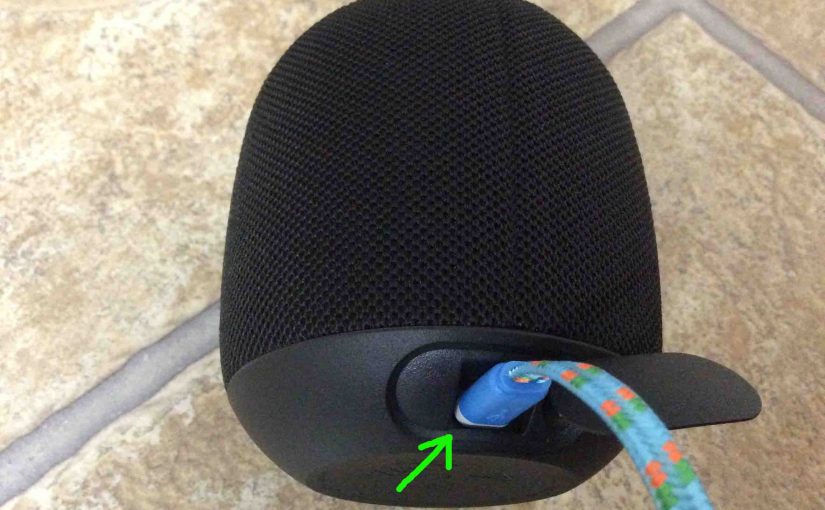
Can You Use Wonderboom 1 While Charging? Yes, you can when following the charging procedure below. Now charging is easy through the sealed micro USB DC in port on the rear bottom of the WB. And if you’re charger is beefy enough, the speaker will indeed play well. Therefore, choose a high current USB AC…
-

Wonderboom 1 Hard Reset Instructions
Here, we give Wonderboom 1 hard reset instructions. These restore the default settings. Factory resetting works as follows. Wonderboom hard reset wipes any memorized Bluetooth devices from memory. Clearing this data prevents the unit from pairing to any nearby Bluetooth devices afterwards. Plus, you might do this to re gift the the Wonderboom 1. Or,…
-

How Long Does a Wonderboom 1 Take to Charge
Covers How Long Does a Wonderboom 1 Take to Charge. Use the hidden micro USB charge port on the back of the unit, near the bottom. So here, we run through the charge procedure. In short, first select a powerful enough USB power adapter. Why? Because Logitech does not include this with the Wonderboom 1…
-

How to Pair Wonderboom 1 to iPhone
This post shows how to pair Wonderboom 1 to iPhone and iOS devices. First, start with your Wonderboom shut OFF (all dark LEDs). Then, follow along to pair it with iPhone. How to Pair Wonderboom 1 to iPhone: Step by Step 1. Visit the Home Screen on your iPhone First off, press the Home button…
-

Can I Use My Wonderboom 1 While Charging
Can I Use My Wonderboom 1 While Charging? Yes, you can when following the charging procedure below. Now charging is easy through the sealed micro USB DC in port on the rear bottom of the WB. And if you’re charger is beefy enough, the speaker will indeed play well. Therefore, choose a high current USB…
-

How Long to Charge Wonderboom 1
Covers How Long to Charge Wonderboom 1. Use the hidden micro USB charge port on the back of the unit, near the bottom. So here, we run through the charge procedure. In short, first select a powerful enough USB power adapter. Why? Because Logitech does not include this with the UE Wonderboom 1 as a…
-

Charging Wonderboom 1
Here are our charging Wonderboom 1 procedure. Use the concealed micro USB power input on the speaker back, near the bottom. In short, first select a powerful enough USB power adapter. Why? Because Logitech does not include this with the Wonderboom 1 as a standard accessory. But you can buy one from them for roughly…
-

Wonderboom 1 Charging
Here’s our Wonderboom 1 charging procedure for this mini Bluetooth model. Charging is easy through the sealed micro USB DC in port on the rear bottom of the WB. First, select a high current USB AC adapter. Why so? Because UE does not include this with the Wonderboom 1. But they sell one that works…